Technical use-case library
Reports Hub | Rabbit Accounts Use-Case Library
Use this page for technical screen behavior, source references, and active Playwright coverage.
Rabbit Accounts
This library is for reviewers, QA, and implementation traceability. Use the product manual for customer-facing guidance.
S16
Reports Hub
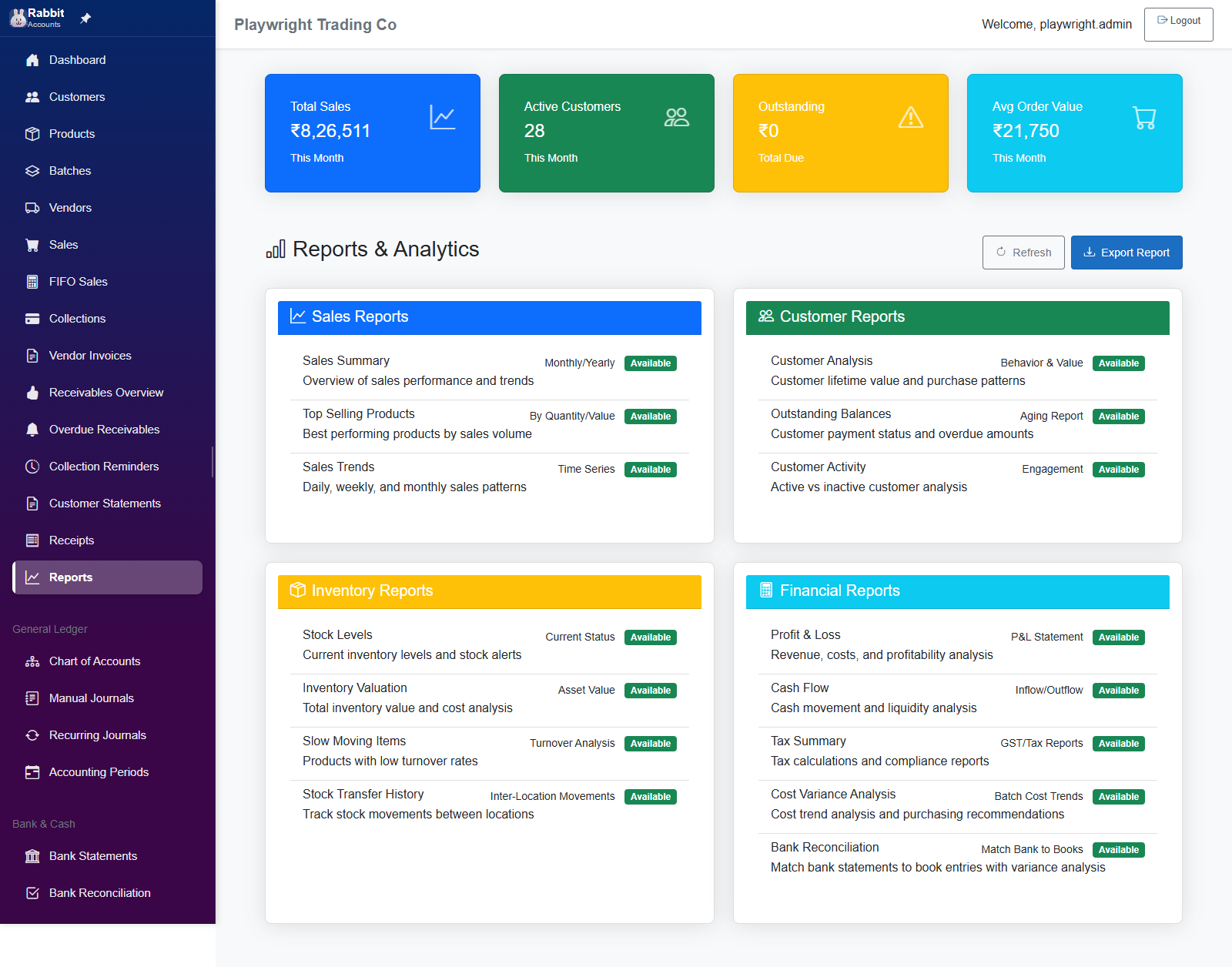
Reports hub page providing current navigation to 15 report destinations across 4 categories: Sales, Customer, Inventory, and Financial. Tile availability and destinations are driven by `ReportConfigurationService`.
Playwright coverage
Functional
- tests/bank-reconciliation.spec.ts Functional
- tests/ui-improvements-validation.spec.ts Screen smoke
Detailed source
11-UC-ReportsIndex.md
UC-RPTIDX: Reports Index Page Use Cases
Page: ReportsIndex.razor
Route: /reports
Menu Position: 11 (Main Navigation > Reports & Analytics)
Overview
Reports hub page providing current navigation to 15 report destinations across 4 categories: Sales, Customer, Inventory, and Financial. Tile availability and destinations are driven by ReportConfigurationService.
Section: Page Header & Actions
| ID | Section | Action | Expected Outcome | Controls Affected |
|---|---|---|---|---|
| UC-RPTIDX-001 | Header | Load page | Reports & Analytics title renders with the chart icon and action buttons |
Page title, icon, action bar |
| UC-RPTIDX-002 | Header | No business selected | Info alert requests business selection before viewing reports | Alert message |
| UC-RPTIDX-003 | Header | Click Refresh | Calls LoadReportData() and refreshes KPI values for the selected business |
Refresh button, KPI cards |
| UC-RPTIDX-004 | Header | Click Export Report | Generates a CSV summary file for the visible KPI values | Export button |
Section: KPI Summary Cards
| ID | Section | Action | Expected Outcome | Controls Affected |
|---|---|---|---|---|
| UC-RPTIDX-005 | KPI | View Total Sales | Blue card shows month-to-date total sales | KPI card 1 |
| UC-RPTIDX-006 | KPI | View Active Customers | Green card shows count of customers with sales this month | KPI card 2 |
| UC-RPTIDX-007 | KPI | View Outstanding | Warning card shows current total due | KPI card 3 |
| UC-RPTIDX-008 | KPI | View Average Order Value | Info card shows average order value for the month | KPI card 4 |
| UC-RPTIDX-009 | KPI | Change selected business | KPI values reload and stay scoped to the selected business only | Business-scoped data |
Section: Sales Reports Card
| ID | Section | Action | Expected Outcome | Controls Affected |
|---|---|---|---|---|
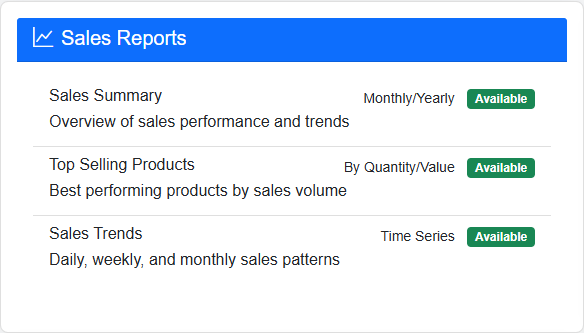
| UC-RPTIDX-010 | Sales | View category header | Sales Reports card renders with 3 actionable report tiles |
Sales category card |
| UC-RPTIDX-011 | Sales | Click Sales Summary | Navigates to /sales-summary-report |
Sales Summary tile |
| UC-RPTIDX-012 | Sales | Click Top Selling Products | Navigates to /sales-summary-report?view=top-products |
Top Selling Products tile |
| UC-RPTIDX-013 | Sales | Click Sales Trends | Navigates to /sales-summary-report?view=sales-trends |
Sales Trends tile |
| UC-RPTIDX-014 | Sales | Review tile status badges | Each sales tile shows its current status text from report configuration | Sales status badges |
Section: Customer Reports Card
| ID | Section | Action | Expected Outcome | Controls Affected |
|---|---|---|---|---|
| UC-RPTIDX-015 | Customer | View category header | Customer Reports card renders with 3 actionable report tiles |
Customer category card |
| UC-RPTIDX-016 | Customer | Click Customer Analysis | Navigates to /customer-analysis-report |
Customer Analysis tile |
| UC-RPTIDX-017 | Customer | Click Outstanding Balances | Navigates to /reports/outstanding-balances |
Outstanding Balances tile |
| UC-RPTIDX-018 | Customer | Click Customer Activity | Navigates to /reports/customer-activity |
Customer Activity tile |
| UC-RPTIDX-019 | Customer | Review tile status badges | Each customer tile shows its current status text from report configuration | Customer status badges |
Section: Inventory Reports Card
| ID | Section | Action | Expected Outcome | Controls Affected |
|---|---|---|---|---|
| UC-RPTIDX-020 | Inventory | View category header | Inventory Reports card renders with 4 actionable report tiles |
Inventory category card |
| UC-RPTIDX-021 | Inventory | Click Stock Levels | Navigates to /reports/stock-levels |
Stock Levels tile |
| UC-RPTIDX-022 | Inventory | Click Inventory Valuation | Navigates to /reports/inventory-valuation |
Inventory Valuation tile |
| UC-RPTIDX-023 | Inventory | Click Slow Moving Items | Navigates to /reports/slow-moving-items |
Slow Moving Items tile |
| UC-RPTIDX-024 | Inventory | Click Stock Transfer History | Navigates to /reports/stock-transfer-history |
Stock Transfer History tile |
| UC-RPTIDX-025 | Inventory | Review tile status badges | Each inventory tile shows its current status text from report configuration | Inventory status badges |
Section: Financial Reports Card
| ID | Section | Action | Expected Outcome | Controls Affected |
|---|---|---|---|---|
| UC-RPTIDX-026 | Financial | View category header | Financial Reports card renders with 5 actionable report tiles |
Financial category card |
| UC-RPTIDX-027 | Financial | Click Profit & Loss | Navigates to /reports/profit-loss-statement |
Profit & Loss tile |
| UC-RPTIDX-028 | Financial | Click Cash Flow | Navigates to /reports/cash-flow |
Cash Flow tile |
| UC-RPTIDX-029 | Financial | Click Tax Summary | Navigates to /tax-summary-report |
Tax Summary tile |
| UC-RPTIDX-030 | Financial | Click Cost Variance Analysis | Navigates to /cost-variance-reporting |
Cost Variance tile |
| UC-RPTIDX-031 | Financial | Click Bank Reconciliation | Navigates to /reports/bank-reconciliation |
Bank Reconciliation tile |
| UC-RPTIDX-032 | Financial | Review tile status badges | Each financial tile shows its current status text from report configuration | Financial status badges |
Section: Export Functionality
| ID | Section | Action | Expected Outcome | Controls Affected |
|---|---|---|---|---|
| UC-RPTIDX-033 | Export | Export report summary | Downloads a CSV file named reports_summary_YYYYMMDD_HHmmss.csv |
Export button, browser download |
| UC-RPTIDX-034 | Export | Verify CSV header | CSV starts with Report Type,Value,Description |
CSV content |
| UC-RPTIDX-035 | Export | Verify CSV rows | CSV contains rows for Total Sales, Active Customers, Outstanding, and Average Order Value | CSV content |
| UC-RPTIDX-036 | Export | Verify exported values | Exported KPI values match the numbers visible on the page at export time | CSV data integrity |
Section: Navigation Feedback
| ID | Section | Action | Expected Outcome | Controls Affected |
|---|---|---|---|---|
| UC-RPTIDX-037 | Navigation | Launch any enabled report tile | Info toast Opening [Report Name]... appears before navigation |
Toast notification |
| UC-RPTIDX-038 | Navigation | Observe route transition | Navigation waits briefly to show feedback, then opens the configured route | Toast delay and route change |
| UC-RPTIDX-039 | Navigation | Launch while a report is generating | Interactions are disabled until generation flow completes | Tile disabled state |
Section: Authorization, Configuration, And Context
| ID | Section | Action | Expected Outcome | Controls Affected |
|---|---|---|---|---|
| UC-RPTIDX-040 | Auth | Open page without required policy | CustomerAdmin policy protects the page |
Authorization |
| UC-RPTIDX-041 | Config | Resolve tile destinations | Tile destinations come from ReportConfigurationService rather than hardcoded screen assumptions |
Report configuration |
| UC-RPTIDX-042 | Config | Resolve status text | Tile badges show current configuration status text for each report | Status badge source |
| UC-RPTIDX-043 | Context | Initialize with valid business | Page loads configurations and KPI data during initialization | Initialization flow |
| UC-RPTIDX-044 | Context | Switch businesses | Business change event triggers KPI reload for the newly selected business | Business selection event |
| UC-RPTIDX-045 | Context | Clear invalid state | When no business is selected, KPI state clears and the info prompt remains visible | Empty-context behavior |
| UC-RPTIDX-046 | Context | Dispose component | Component unsubscribes from BusinessSelection.OnChanged on dispose |
Cleanup |
Section: Current Live Regression Notes
| ID | Section | Action | Expected Outcome | Controls Affected |
|---|---|---|---|---|
| UC-RPTIDX-047 | Regression Basis | Use this doc for live test routing | Current route assertions match ReportsIndex.razor and ReportConfigurationService.cs |
Canonical routing |
| UC-RPTIDX-048 | Regression Basis | Exclude legacy placeholder routes | Customer, inventory, and financial tiles do not use the older shared-placeholder destinations | Legacy route cleanup |
| UC-RPTIDX-049 | Regression Basis | Exclude obsolete Tax Summary alert checks | Tax Summary is treated as a live routed report in the current basis | Tax Summary coverage |
| UC-RPTIDX-050 | Regression Basis | Count the active report destinations | Reports hub covers 15 current destinations across 4 categories | Coverage proof |
Total Use Cases: 50
Visual walkthrough
Screen snapshots
Open any image for a closer look. The manual keeps screenshots on screen pages so the index stays light.