Customers | Rabbit Accounts Use-Case Library
Use this page for technical screen behavior, source references, and active Playwright coverage.
Customers
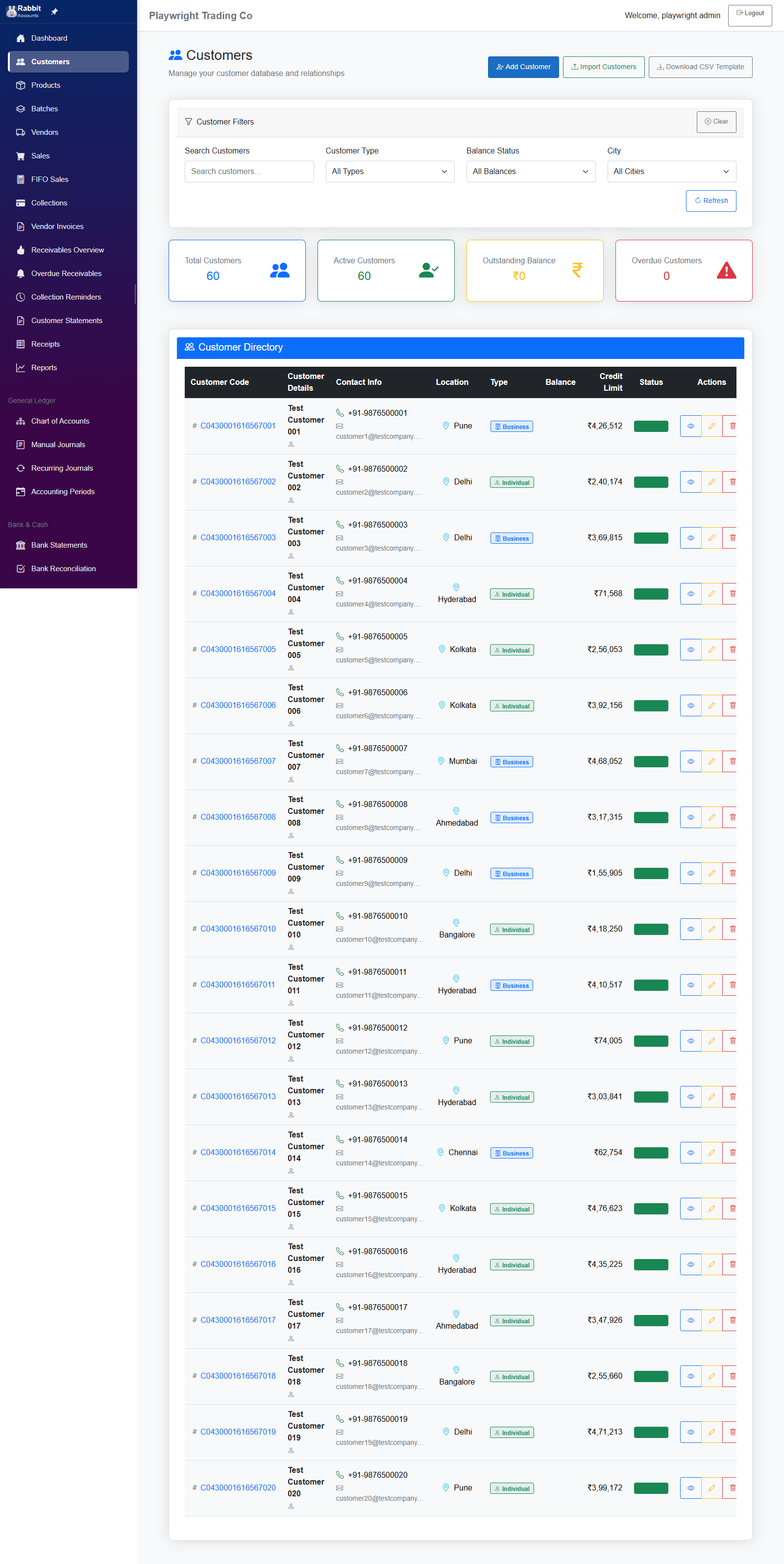
Customer management with CRUD operations, filters, Excel import, and customer directory.
Screen smoke
- tests/ui-improvements-validation.spec.ts Screen smoke
02-UC-Customers.md
UC-Customers: Customer Management Page Use Cases
Page: Customers.razor
Route: /customers
Menu Position: 2 (Customers)
Overview
Customer management with CRUD operations, filters, Excel import, and customer directory.
Section: Page Header & Actions
| ID | Section | Action | Expected Outcome | Controls Affected |
|---|---|---|---|---|
| UC-CUST-001 | Header | Load page | Title "Customers - [BusinessName]", h2 shows "Customers" with icon, subtitle "Manage your customer database and relationships" | PageTitle, h2, p subtitle |
| UC-CUST-002 | Header | No business selected | Alert "Please select a business to view customers" | alert alert-info |
| UC-CUST-003 | Actions | Click "Add Customer" | Modal opens with title "Add New Customer", empty form fields | customerModal, modal title |
| UC-CUST-004 | Actions | Click "Import Excel" | Import modal opens with file upload field | Import modal |
| UC-CUST-005 | Actions | Click "Download Template" | Excel template file downloads | Browser download |
Section: Customer Filters
| ID | Section | Action | Expected Outcome | Controls Affected |
|---|---|---|---|---|
| UC-CUST-006 | Filter | View filter section | Shows 4 filters: Search Customers, Customer Type, Balance Status, City + Clear/Refresh buttons | StandardFilterSection, 4 fields |
| UC-CUST-007 | Filter | Type in Search box | Customers table filters in real-time matching name/code/contact | Search textbox, table rows |
| UC-CUST-008 | Filter | Select "Individual" from Customer Type | Shows only Individual type customers | Customer Type select, table rows |
| UC-CUST-009 | Filter | Select "Business" from Customer Type | Shows only Business type customers with building icon badge | Customer Type select, table rows |
| UC-CUST-010 | Filter | Select "Clear" from Balance Status | Shows customers with ₹0 balance | Balance Status select, table rows |
| UC-CUST-011 | Filter | Select "Current" from Balance Status | Shows customers with positive non-overdue balance | Balance Status select, table rows |
| UC-CUST-012 | Filter | Select "Due" from Balance Status | Shows customers with due but not overdue balance | Balance Status select, table rows |
| UC-CUST-013 | Filter | Select "Overdue" from Balance Status | Shows customers with overdue invoices | Balance Status select, table rows |
| UC-CUST-014 | Filter | Select "Over Limit" from Balance Status | Shows customers over their credit limit | Balance Status select, table rows |
| UC-CUST-015 | Filter | Select city (e.g., "Mumbai") | Shows only customers from Mumbai | City select, table rows |
| UC-CUST-016 | Filter | City dropdown options | Lists all unique cities from customer data | City select options |
| UC-CUST-017 | Filter | Click "Clear" button | All filters reset, full customer list shown | Clear btn, all filters, table rows |
| UC-CUST-018 | Filter | Click "Refresh" button | Reloads customer data from server | Refresh btn, table rows |
| UC-CUST-019 | Filter | Combine filters | Multiple filters AND together | All filter controls, table rows |
Section: Summary Cards
| ID | Section | Action | Expected Outcome | Controls Affected |
|---|---|---|---|---|
| UC-CUST-020 | Summary | Total Customers card | Blue border, shows total count, people icon | card border-primary, h3 text-primary, icon |
| UC-CUST-021 | Summary | Active Customers card | Green border, shows active count, person-check icon | card border-success, h3 text-success, icon |
| UC-CUST-022 | Summary | Outstanding Balance card | Yellow border, shows total outstanding ₹, currency icon | card border-warning, h3 text-warning, icon |
| UC-CUST-023 | Summary | Overdue Customers card | Red border, shows overdue count, warning icon | card border-danger, h3 text-danger, icon |
| UC-CUST-024 | Summary | Apply filter | Summary cards update to reflect filtered data | All 4 summary card values |
Section: Customer Directory Table
| ID | Section | Action | Expected Outcome | Controls Affected |
|---|---|---|---|---|
| UC-CUST-025 | Table | View table header | 9 columns: Customer Code, Customer Details, Contact Info, Location, Type, Balance, Credit Limit, Status, Actions | thead th × 9 |
| UC-CUST-026 | Table | View customer row | Shows: code with hash icon, name+contact person, phone+email, city, type badge, balance (₹), credit limit (₹), status badge, 3 action buttons | tr cells |
| UC-CUST-027 | Table | Customer Code column | Shows hash icon + code in primary color | customer-code text-primary |
| UC-CUST-028 | Table | Customer Details column | Two lines: Customer Name (bold), Contact Person (muted with person icon) | customer-details |
| UC-CUST-029 | Table | Contact Info column | Two lines: Phone (green phone icon), Email (envelope icon, truncated) | contact-info |
| UC-CUST-030 | Table | Location column | City with geo-alt icon in info color | bi-geo-alt text-info |
| UC-CUST-031 | Table | Type = Business | Blue badge "Business" with building icon | badge bg-primary |
| UC-CUST-032 | Table | Type = Individual | Green badge "Individual" with person icon | badge bg-success |
| UC-CUST-033 | Table | Balance column | Right-aligned, format ₹X,XX,XXX.XX | text-end |
| UC-CUST-034 | Table | Credit Limit column | Right-aligned, format ₹X,XX,XXX | text-end |
| UC-CUST-035 | Table | Status = Active | Green badge "Active" with check-circle icon | badge bg-success |
| UC-CUST-036 | Table | Status = Inactive | Gray badge "Inactive" with pause-circle icon | badge bg-secondary |
| UC-CUST-037 | Table | Max 20 rows | Table shows first 20 customers | tbody tr × 20 max |
| UC-CUST-038 | Table | No customers | Empty state: people icon, "No customers found", "Add your first customer", Add Customer button | Empty state UI |
Section: Customer Actions
| ID | Section | Action | Expected Outcome | Controls Affected |
|---|---|---|---|---|
| UC-CUST-039 | Actions | Click View (eye icon) | Customer details modal/view opens | View modal |
| UC-CUST-040 | Actions | Click Edit (pencil icon) | Edit modal opens with customer data pre-filled | Edit modal |
| UC-CUST-041 | Actions | Click Delete (trash icon) | Confirmation prompt, then customer deleted | Confirm dialog, table update |
Section: Loading State
| ID | Section | Action | Expected Outcome | Controls Affected |
|---|---|---|---|---|
| UC-CUST-042 | Loading | During load | Spinner with "Loading customers..." text | spinner, loading text |
Section: Add/Edit Customer Modal
| ID | Section | Action | Expected Outcome | Controls Affected |
|---|---|---|---|---|
| UC-CUST-043 | Modal | View modal fields | Fields: Customer Code, Name*, Contact Person, Phone*, Email, Customer Type, Address, City, Credit Limit | Modal form fields |
| UC-CUST-044 | Modal | Submit without required | Validation messages for required fields | ValidationMessage components |
| UC-CUST-045 | Modal | Save successfully | Spinner, customer saved, modal closes, table refreshes | Modal close, table update |
Section: Data Validation
| ID | Validation | Requirement |
|---|---|---|
| UC-CUST-046 | Customer Count | Must show customers when data exists |
| UC-CUST-047 | Outstanding Total | Sum of all customer balances |
| UC-CUST-048 | Cities Available | Dynamically populated from customer data |
| UC-CUST-049 | Currency Format | All ₹ amounts use Indian format (₹X,XX,XXX) |
| UC-CUST-050 | Filter Consistency | Summary cards and table always match |
Section: Unit Test Coverage
| Test Class | Test Count | Coverage Areas | Related Use Cases |
|---|---|---|---|
CustomerBalanceTests |
41 | Credit calculations, balance status thresholds, display formatting, customer types | UC-CUST-010 to UC-CUST-014, UC-CUST-027, UC-CUST-030, UC-CUST-033, UC-CUST-034 |
Unit Tests Summary
Location: Rabbit.Accounts.Tests/Customers/CustomerBalanceTests.cs
Test Categories:
- AvailableCredit Tests (5 tests) - Credit limit minus balance calculations
- IsOverLimit Tests (5 tests) - Over credit limit detection including boundary cases
- DaysSinceLastPayment Tests (4 tests) - Payment aging calculations
- BalanceStatus Tests (13 tests) - Clear/Current/Due/Overdue/Long Overdue/Over Limit status determination with boundary tests
- DisplayName Tests (3 tests) - Customer code and name formatting
- FullAddress Tests (4 tests) - Address component joining with comma separation
- CustomerTypes Tests (7 tests) - Type validation (Retail/Wholesale/Distributor)
Business Logic Thresholds:
- Clear: Balance ≤ 0
- Over Limit: Balance > Credit Limit (takes precedence over age-based statuses)
- Long Overdue: Last payment > 90 days ago
- Overdue: Last payment > 60 days ago
- Due: Last payment > 30 days ago
- Current: Last payment ≤ 30 days ago
Note: Customer management is primarily CRUD operations. Service layer tests would require database mocking. These tests cover all computed properties used for display and status determination.
Total Use Cases: 50
Screen snapshots
Open any image for a closer look. The manual keeps screenshots on screen pages so the index stays light.